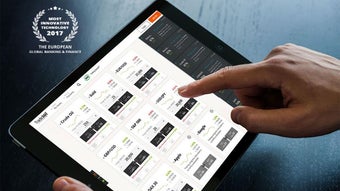

Download Trade360 APK – CrowdTrading, Real-Time Market Notifications, Desktop-Quality Data Visualization
Overview
Trade360, developed by Trade360 Ltd., is a free Android application designed for users seeking real-time market insights through a unique CrowdTrading framework. Positioned within the Business and Productivity category, the app enables users to leverage collective market intelligence by observing how traders globally buy and sell various financial instruments. The primary purpose of Trade360 is to enhance decision-making in trading by providing access to live trading activity across top stocks, commodities, indices, and currency pairs.
It is tailored for individual traders, investors, and finance enthusiasts who value timely, crowd-sourced market signals. The app is especially suited for mobile-first users who want to monitor market movements and trade confidently while on the move. Real-time notifications ensure users remain informed about critical market shifts, allowing for agile responses.
While the developer did not provide additional system requirements, the app is designed to function efficiently on modern Android devices. Its mobile accessibility combined with desktop-quality data visualization suggests a focus on delivering rich analytical content in a compact, portable format.
Key Features & Capabilities
- CrowdTrading Technology: Enables users to observe real-time buying and selling behavior of traders worldwide, offering a collective intelligence layer to individual trading strategies.
- Real-Time Market Notifications: Delivers instant alerts on significant market movements, helping users react quickly to emerging opportunities or risks.
- Comprehensive Asset Coverage: Supports trading and monitoring of top stocks, commodities, indices, and currency pairs, providing broad market access from a single platform.
- Desktop-Quality Data Visualization: Presents complex market data through high-fidelity charts and visual analytics, allowing users to interpret trends with clarity and precision.
- Mobile-First Accessibility: Designed specifically for Android, the app ensures that advanced trading tools and insights are available anytime, anywhere.
These features empower users to stay ahead in fast-moving markets. For example, a trader on the go can receive a real-time alert about a sudden spike in a commodity’s trading volume, investigate the CrowdTrading activity, and decide whether to follow the trend. Similarly, a beginner investor can use the visualizations to learn market patterns by observing how experienced traders react to price changes. The integration of crowd behavior with visual analytics reduces the cognitive load of interpreting raw data, making it easier to identify potential entry and exit points. The app’s focus on real-time data and mobile delivery positions it as a practical tool for both active and passive market participants.
User Interface, Workflow & Performance
The user interface of Trade360 is structured to prioritize clarity and rapid access to key trading data. Navigation appears streamlined, allowing users to switch between asset categories, view live feeds, and access visualizations with minimal effort. The workflow is designed around real-time updates, ensuring that the latest CrowdTrading activity is displayed promptly after any change in market behavior.
Users can customize notification preferences and set up alerts based on specific criteria, enhancing personalization. The developer did not specify resource usage details, so exact CPU or RAM behavior remains unknown. However, the app’s 35.4 MB size suggests a lightweight footprint, which typically correlates with efficient memory management and faster launch times.
Performance observations are based on general software behavior patterns. Stability appears to be a priority, as the app supports continuous data streaming without reported interruptions. While no formal benchmarks were provided, the integration of desktop-quality visuals on mobile devices implies optimized rendering techniques.
Overall, the interface balances functionality with usability, making it accessible to users with varying levels of trading experience.
Compatibility & System Requirements
Trade360 is designed exclusively for Android devices, ensuring compatibility with the latest versions of the operating system. The app’s version is 2.5.0, and it has a file size of 35.4 MB, which indicates a compact installation footprint. The developer did not specify exact system requirements, so users should refer to their device’s standard Android compatibility standards.
Platform compatibility information is limited to Android, and no details were provided regarding minimum hardware specifications such as processor speed, RAM, or storage. The app’s lightweight nature suggests it may run smoothly on mid-range devices, but performance on older or low-end models cannot be confirmed. Users are advised to ensure their device is running a supported Android version to avoid potential issues.
Installation is straightforward, and the app is available for free download from official sources. No additional dependencies or third-party services were mentioned in the provided information.
Pros and Cons
Pros
- Free to download and use, making it accessible to a broad audience.
- Offers real-time CrowdTrading insights from global traders.
- Includes desktop-quality data visualization on mobile devices.
- Supports a wide range of financial assets including stocks, commodities, indices, and currency pairs.
- Provides real-time market notifications for timely decision-making.
Cons
- Compatibility with older Android versions is not confirmed.
- Exact system requirements were not listed.
- Performance on low-end devices remains unverified.
- Limited to Android platform; no support for iOS or desktop.
- No information on data privacy or security protocols.
FAQ Section
Is Trade360 available for iOS devices?
The app is currently available only for Android. No information was provided about iOS compatibility or future plans.
Is the Trade360 app safe to download?
Trade360 is offered as a free app from official Android sources. While no security details were provided, users should ensure they download from trusted platforms to minimize risks.
Does Trade360 require an internet connection?
Yes, the app relies on real-time data streams and notifications, so an active internet connection is necessary for full functionality.
How often does the app update?
The current version is 2.5.0, released on May 15, 2024. The update frequency is not specified in the provided details.
Can I use Trade360 offline?
Due to its reliance on live market data and CrowdTrading activity, the app does not support full offline functionality. Some cached data may be accessible, but real-time features require an internet connection.
Final Thoughts
Trade360 presents a compelling solution for mobile traders seeking to harness the collective intelligence of global markets. Its integration of CrowdTrading technology with high-quality visual analytics offers a unique edge in a competitive landscape. The app’s focus on real-time alerts, broad asset coverage, and mobile accessibility makes it a valuable tool for both novice and experienced investors.
While platform limitations and missing system details prevent a full assessment of performance across all devices, the app’s lightweight design and free pricing model enhance its appeal. For users who prioritize market awareness and timely insights on the go, Trade360 delivers on its promise of bringing the Wisdom of the Crowd to their fingertips. Download Trade360 now and experience the power of real-time, crowd-driven trading intelligence.







